


Original Xiaomi Smart Band 10/9/8 Multi-Function Dock - Facial Expression LED Alarm Clock, Desktop E-Pet Companion, Charging Sta
Original Xiaomi Smart Band 10/9/8 Multi-Function Dock - Facial Expression LED Alarm Clock, Desktop E-Pet Companion, Charging Sta
SPECIFICATIONS
Battery Included: Yes
Brand Name: XIAOMI
Certification: CE
Choice: yes
Communication method: Bluetooth-Compatible
Control Channels: 2 CHANNELS
Does It Includes Wireless Communication: No
Features: Flashing,musical,Magnetic
High-concerned chemical: None
Inbox adaptor: No
Origin: Mainland China
Power Source: Other,Other
Scale: 1:5
State of Assembly: Ready-to-Go
Xiaomi Multi Functional Ble Speaker
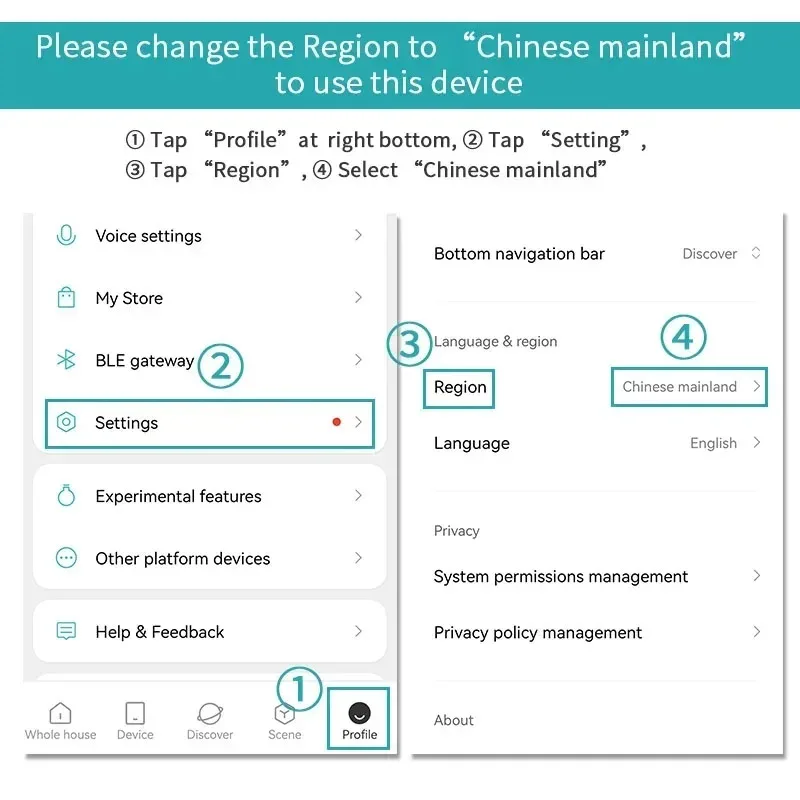
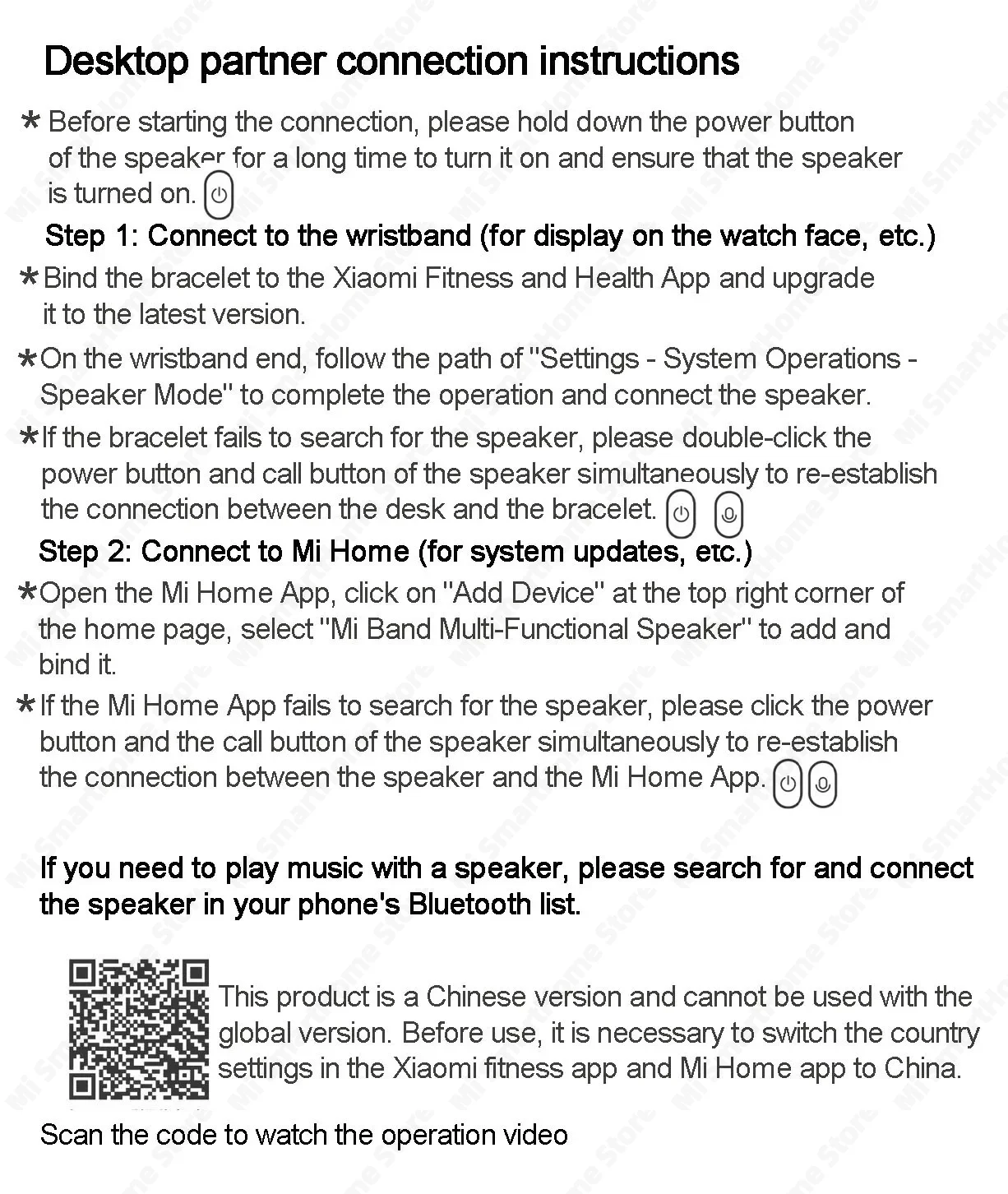
This product is a Chinese version and cannot be used with the global version. Before use, it is necessary to switch the
country/region settings in the Xiaomi Sports app and Mi Home app to China.
Cute and fun expressions, providing emotional value at any time. Supports functions such as clock display, alarm reminder, and music playback.
The mini and compact speaker structure takes into account the different frequency bands of high, medium and low tones, and delivers a big
performance despite its small size. It can be more integrated with the Mi Home APP, and more fun interactions are waiting for you to unlock.
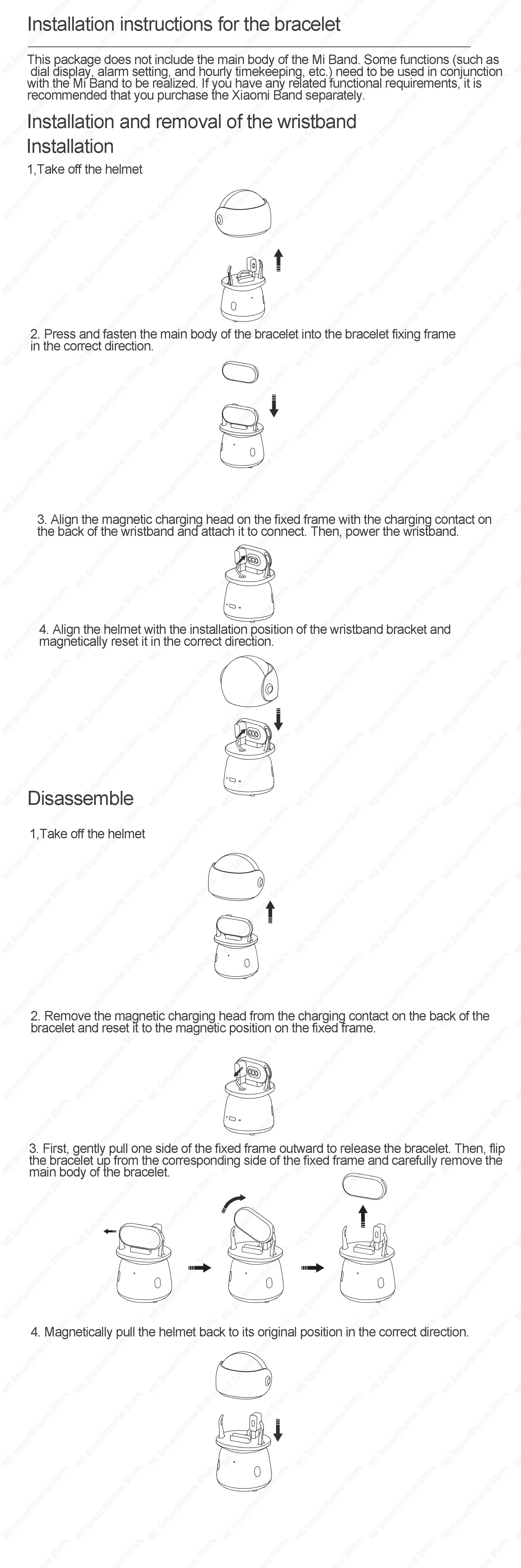
Compatible with Mi Band 8, 9 and 10 generations.


Use
Power on/off
Power on/off
Press and hold the power button for 2 seconds when the device is off to turn it on.
Press and hold the power button for 2 seconds when the device is on to turn it off.
Paired connection
First connection
After the table is turned on, it will automatically enter the mobile phone Bluetooth search connection mode and emit a prompt tone. On the Bluetooth Settings page of the mobile device, find and select "Xiaomi Multi Functional Ble Speaker" to connect.
Automatic reconnection
After the speaker is turned on, the mobile phone's Bluetooth will automatically connect to the device that was successfully paired last time.
There will be a prompt sound after the connection. If the connection fails, the speaker will automatically enter the mobile phone Bluetooth search connection mode.
Disconnection and reconnection
On the Bluetooth interface of the mobile device, you can manually choose to disconnect from the speaker, or double-click the power button when the desk is turned on,
and the speaker will re-enter the mobile phone's Bluetooth search connection mode.
Hint
1,This product supports the following three Bluetooth connection modes:
Mobile phone Bluetooth pairing: After turning on the Bluetooth of the mobile device, double-click the power button of the speaker
to initiate a connection with the mobile device for audio transmission.
Bracelet BLE pairing: After the bracelet enters the speaker mode, double-click the power button and call button of the speaker simultaneously
to initiate a connection with the Xiaomi bracelet, which can be used for functions such as alarm clock on the bracelet.
Mi Home BLE Pairing: After opening the Mi Home APP, simultaneously click the power button and the call button of the speaker to initiate
a connection with the Mi Home APP, which is used to access the Mi Home APP.
2. The table-setting function may be affected by factors such as the compatibility of connected devices, software versions, and audio source quality. If abnormal playback sounds or poor sound quality occur, please make adjustments based on actual experience.
Music play and pause
When playing music, click the call button to pause, and click the call button again to play.
Music track switching
When playing music, you can switch tracks by pressing the call button.
Double-click: Next song
The third strike: The previous one
Note: Due to the influence of different software, the specific implementation result is subject to the actual situation.
Hands-free function for incoming calls
When a phone paired with the speaker via Bluetooth calls, click the call button to answer the call, double-click the call button to reject the call,
and click the call button to hang up the call during the call.
Some mobile device models do not support the hands-free function for incoming calls. Please refer to the actual experience effect.
Hands-free function for incoming calls
When a phone paired with the speaker via Bluetooth calls, click the call button to answer the call, double-click the call button to reject the call,
and click the call button to hang up the call during the call.
Some mobile device models do not support the hands-free function for incoming calls. Please refer to the actual experience effect.
Low battery and charging functions
When the battery power is less than 20%, there will be a prompt sound to remind you to charge it in time, accompanied by a flashing red light. If not charged in time, the table will automatically shut down due to battery depletion. It is equipped with a built-in 480mAh lithium battery and can be charged via Type-C connected to a power port (such as a power adapter). (Please purchase through a regular channel. The output voltage should be 5V or above.)
Product features
Product features
Materials and care
Materials and care
Merchandising tips
Merchandising tips



Total de itens
Subtotal do produto